TIREVIO


 Frequently Asked Questions on TPMS Sensor Programming
TPMS stands for Tire Pressure Monitoring System. It is an electronic system that monitors the air pressure inside your vehicle's tires and alerts you if the pressure drops dangerously low.
There are two main types of TPMS:
· Direct TPMS: Uses physical, battery-powered pressure sensors mounted inside each tire that send real-time pressure data directly to the vehicle's computer.
· Indirect TPMS: Relies on your car's Anti-lock Braking System (ABS) wheel speed sensors. An under-inflated tire has a smaller diameter and spins faster than a properly inflated one. The computer detects this difference and triggers a warning.
No. In the United States, federal standards require TPMS to warn drivers only when a tire is under-inflated by 25% or more below the manufacturer’s recommendation. It will not warn you if your tires are over-inflated.
Do not inflate your tires to the maximum PSI printed on the tire sidewall. Instead, check the manufacturer's recommended placard, which is a sticker located on the edge of the driver's side door jamb.
Tire pressure drops about 1 PSI for every 10 degrees the temperature drops. When winter cold spells hit, the air inside your tire condenses, causing the pressure to fall into the trigger zone for a TPMS warning.
A steady, solid light means at least one of your tires is 25% or more below the recommended cold inflation pressure. Stop the vehicle safely and check the pressure in all four tires (including the spare) with a manual gauge.
A light that flashes for 60 to 90 seconds upon starting the car and then stays solid indicates a system malfunction. This means a sensor battery is dead, a sensor is damaged, or the system has lost communication with the sensors.
Sensors in Direct TPMS systems run on internal batteries that generally last between 5 to 10 years. Once the battery is depleted, the entire sensor must be replaced.
No, you do not always need to replace the sensors just because you bought new tires. However, it is an industry best practice to replace the rubber valve stems, cores, and grommets (the TPMS "service kit") every time a tire is dismounted to prevent future air leaks.
It depends on your vehicle. For many cars with Indirect TPMS, no action is required. For Direct TPMS with specific dashboard displays that tell you which exact tire has low pressure, the sensors must be relearned to the vehicle's computer, so it knows their new locations.
Yes, but the method varies heavily by vehicle. Some cars have a dedicated reset button under the steering wheel. Others require you to navigate through your dashboard's audio/vehicle settings to select "calibrate". For many Direct systems, you will need to drive the car for 15 to 30 minutes at speeds between 30 and 60 mph for the sensors to sync.
This typically happens for three reasons:
1. You may have filled the tire to the sidewall's maximum PSI instead of the door placard PSI.
2. A sensor battery is dead.
3. The spare tire (which also can have a TPMS sensor in it) is low on air.
It shouldn't, but custom rims can sometimes interfere with Direct TPMS sensors. You must ensure the new wheels are compatible with the specific TPMS sensors your vehicle requires. If the sensors cannot be properly mounted, your TPMS light will remain illuminated.
Professional mechanics use specialized TPMS tools to activate, clone, and program replacement sensors. These tools trigger the sensor to send a radio frequency signal so the vehicle’s ECU (computer) can register its unique ID.
Yes. TPMS is an emergency warning system, not a replacement for routine manual checks. Because it only warns you when pressure drops by 25%, your tires could be running slightly low—affecting fuel economy and even tread wear—without the light ever turning on. Check your tire pressure with a manual gauge at least once a month.
Troubleshooting Persistent TPMS Warning Lights After Programming
During TPMS sensor matching operations, technicians frequently encounter unresolved warning lights post-programming.
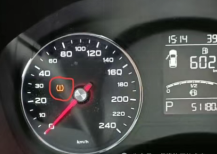
Follow this verification sequence:
Verification Steps
Eliminate Sensor Interference
·Relocate original sensors beyond 100m radius from vehicle
· Prevents signal conflicts with newly programmed units
Validate Tire Pressure
· Inflate tires to exact specification on B-pillar placard
· Example: 230kPa requirement ≠ 180kPa inflation (triggers warnings)
Confirm Programming Menu Selection
· Verify correct vehicle model/year menu in diagnostic tool
Sensor Learning Procedure (Post-Verification)
Tool Navigation Path:
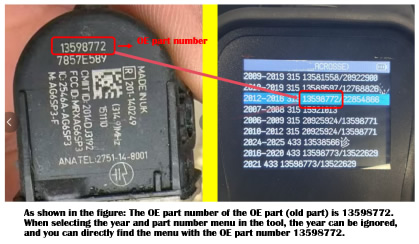
Home → Service → Select Model Year (OE P/N) → Sensor Learning
Learning Mode Identification:
· "Auto" labeled menus: Autonomous learning mode (15-25 min drive cycle)
· "Diag" labeled menus: OBD diagnostic learning (ignition-on procedure)
· GM vehicles (Buick/Cadillac/Chevrolet): Mandatory manual learning
TPMS Sensor Detection Failure: Case Analysis & Solutions
Sensor undetection requires case-specific analysis. The most common causes are:
Incorrect model year/OEM part number selection in diagnostic menu
Sensor hardware failure preventing signal transmission
Refer to the troubleshooting flowchart below for systematic resolution procedures.
Troubleshooting Protocol
· Step 1: Verify menu selection matches vehicle VIN-derived specifications
· Step 2: Perform bench test on sensor using TPMS diagnostic tool
· Step 3: Check sensor battery voltage (typical range: 2.8-3.3V)
· Step 4: Validate RF transmission frequency (315MHz/433MHz)
Resolution path indicated by diagnostic results:
→ Menu error: Re-select correct OEM part number
→ Low voltage: Replace sensor
→ No RF signal: Install new sensor
Symptom
Dashboard displays persistent "0" or flashing value (oscillating between 0 and normal pressure), confirmed by diagnostic tool readout.
Root Cause
Vehicle detects old sensors or uninstalled TPMS units transmitting signals.
Resolution
Search vehicle interior for residual sensors
Relocate all unused sensors >100m from vehicle
Conduct road test above 25km/h for 5+ minutes
If unresolved: Perform "Create New ID + OBD Learning" procedure
Tool path: Service > Programming > Sensor Initialization
Identify OE sensor (original unit)
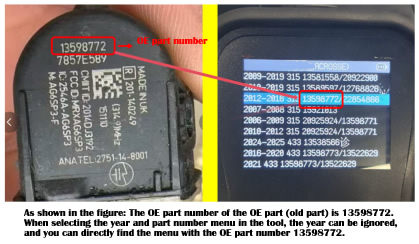
Locate OE part number printed on sensor body
In diagnostic menu:
· Select Sensor Programming → OE Replacement
· Find matching part number in database
*Example: TPMSC-023 (315MHz) shown below*
Root Cause
Valid sensor IDs are 8-digit codes. Manufacturers may suppress leading zeros (0/00) in printed markings.
Resolution Procedure
Input the 6/7-digit ID shown on sensor
Proceed to next programming step
Tool automatically prepends required zeros
Install programmed sensor
Conduct road test (>25km/h for 5+ minutes)
Key Characteristic:
· Factory-unmarked sensor IDs
Programming Solutions (Select Preferred Method):
Method 1: ID Retrieval Function
Access tool: TPMS > ID Recovery > Auto-Scan
Follow on-screen prompts
Method 2: Battery Replacement Protocol
Extract OE sensor battery (CR2032)
Install new CR2032 battery
Read ID via Sensor Programming > Direct Read
Program cloned ID
Method 3: Live Data Stream Access
Navigate: Diagnostics > TPMS > Data Stream
Record wheel-position-specific IDs
The "ECU Identification Number" refers to sensor IDs stored in the TPMS receiver module. Matching requires programming corresponding part numbers to wheel positions.
Failure Scenario
When retrieved IDs display abnormal patterns (e.g. RF: A0A0A0A0, RR: B1B1B1B1) or show 00000000/FFFFFFFF - indicating receiver ID loss ("pairing drop") - sensors won't register even with correct programming.
Resolution Protocol
Execute Create New ID function
Perform OBD relearn:
Diagnostics > TPMS > Relearn > OBD Mode
Drive >30km/h for 8+ minutes
Verification Requirement
When encountering programming failures, confirm:
OE part number on original sensor
RF frequency (315MHz/433MHz)
MUST MATCH diagnostic tool menu selection as illustrated below:
Critical Logic
Successful programming requires dual-parameter alignment:
Identical OE part number
Matching RF frequency
Mandatory Pre-Programming Checklist
[ ] Verified OE part number (e.g. TPMSC-203)
[ ] Confirmed frequency (315MHz/433MHz)
[ ] Selected correct tool menu entry
Trigger Sensor Vehicle Protocol
For vehicles equipped with TPMS trigger sensors:
Factory-installed digital display dashboards
· Required component: PMV-C010 OEM-specific sensor
·Programming method: Direct OBD initialization
Non-digital analog dashboards
· Compatible component: Universal programmable sensors (e.g. E-Motor)
· Programming method: Auto-relearn via trigger activation